waveshare 1.44" tft lcd HAT (st7735s) raspberry pi setup: Enable ‘SPI’ inside ‘Advanced Options’ and then ‘SPI’. You will simply get a yes/no option for the ‘SPI’ setting. Advanced Options’ section is ‘Overscan’. When asked ‘Would you like to enable compensation for displays with overscan?’ you can select No sudo nano /etc/modules add the following into the file (if the lines are not already there) spi-bcm2835 fbtft_device sudo nano /etc/modprobe.d/fbtft.conf add: options fbtft_device name=adafruit18_green gpios=reset:27,dc:25,cs:8,led:24 speed=40000000 bgr=1 fps=60 custom=1 height=128 width=128 rotate=180 sudo apt-get install cmake git and now we have the tools, we can grab the code from github, and build it cd ~ git clone https://github.com/tasanakorn/rpi-fbcp cd rpi-fbcp/ mkdir build cd build/ cmake .. make sudo install fbcp /usr/local/bin/fbcp cd ~ git clone https://github.com/adafruit/Adafruit-Retrogame cd Adafruit-Retrogame/ make sudo ...
Posts
Can't update macOS High Sierra
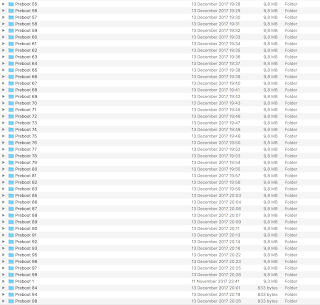
You can't update macOS High Sierra? You are on 10.13.x, but the 10.13.x +1 won't install? It goes through the download and reboot, but when it is done you are still on same 10.13 ? You can't install kext extensions anymore ? Tried downloading combo updates ? Tried installing direct downloads ? You get in the logs: Could not create a Preboot Volume for APFS install Or you get: Could not update Preboot Volume well... not anymore.. You don't need to reinstall or anything. Check your /Volumes/ folder you probably will see countless preboot volumes there.. This has to be a weird mac os bug. I had 99 folders, probably can't create anymore and hence no more updates for Mac os or no more low level kernel drivers installations... What you need to do is to delete all the folders except the Preboot one. So you should end up with only 1 preboot directory in volumes directory.. Reboot, reinstall and everythi...
how to install google play services to asus tinker board
Asus recently released a new version of android operating system for it's Asus tinker board.You can download the latest version from here: https://www.asus.com/Single-Board-Computer/Tinker-Board/HelpDesk_Download/ However, it comes without google play store. If you want to install google play store, there are lots of versions of it around the web, but which one will work? The correct google play version to select for Asus tinker board is this one: http://www.apkmirror.com/apk/google-inc/google-play-services/google-play-services-10-5-62-release/google-play-services-10-5-62-438-153733333-android-apk-download/ google services: http://www.apkmirror.com/apk/google-inc/google-services-framework/google-services-framework-6-0-1-release/google-services-framework-6-0-1-android-apk-download/download/ this time download the google play store from: http://www.apkmirror.com/apk/google-inc/google-play-store/google-play-store-7-7-31-release/google-play-store-7-7-31-o-all-0-pr-15...
asus tinker board boot problems

Recently got an Asus tinker board , flashed images but no matter it won't boot. Neither android image or debian one. Turns out the problem was with the power supply. This beast requires really a lot power. If you run into issues , try to connect a more powerful usb charger. Apple's iphone charges won't do it.
how can you enable a windows firewall rule for a dynamic dns name or dns address
in a windows server sometimes you just need to enable some ports on your firewall to your dynamic dns address.(such as RDP , FTP , etc..) It is cumbersome when you do this manually every time your ip address changes.Why not update your server automatically every time when your ip changes based on your new dynamic dns update ? 1 ) just create a powershell script like this: $ip = [System.Net.Dns]::GetHostAddresses(" your ddnss address ").IpAddressToString Set-NetFirewallRule -DisplayName " myrule " -RemoteAddress $ip Put in your ddns name like: xxx.dydns.org , no-ip etc.. Create a firewall rule and define ports etc. before hand and name it either "myrule" and use the second line as it is ,or change the "myrule" to your rule's display name on advanced firewall app on windows server. 2) name it as firewall.ps1 3) and than create a task on task scheduler like this: command to execute: powershell -executionpolicy remotesigned -File...
windows 7 can't find files with extension *.pdb , try yourself:
Windows 7 can't find files with extension *.pdb , try yourself: Open a directory where you know that there are files with *.pdb extension type search *.pdb and windows 7 will not be able to find any files and display error message: No items match your search. That's crazy bug ! It works as expected for other file extensions though . such as *.mp3 , *.html or whatever..
